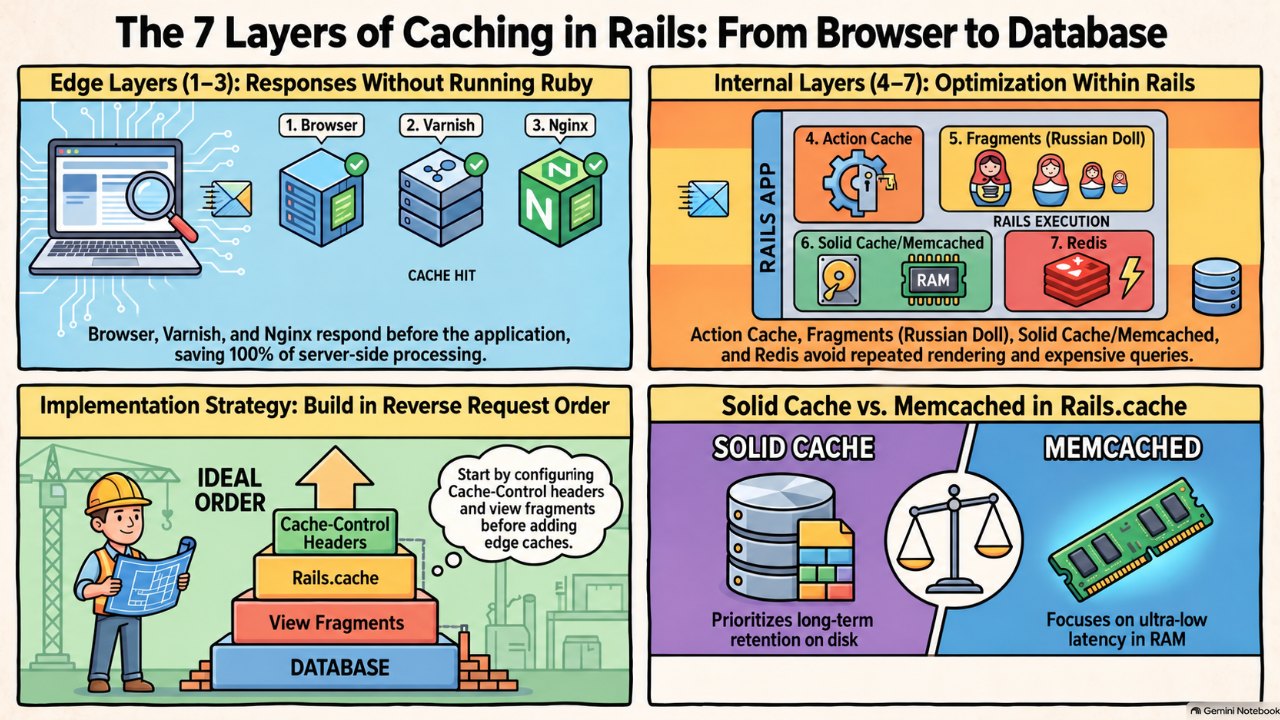
Seven Layers of Cache in a Rails Application, From the Browser to the Database
TL;DR
A request can be answered at seven points before it reaches Postgres: browser cache, Varnish, Nginx, action cache, Russian doll fragments, the Rails.cache store, and an object cache on Redis. The first three never run Ruby. Start with Cache-Control headers, then fragments, then objects, and only then the edge.
A web application's speed is not just the speed of the app server and the database. Between the browser and the SELECT there are seven places where the answer may already exist. This post walks through all of them, with the Rails configuration for each and what each one actually saves.
Also available in Português (Brasil)
When a request reaches a web application, how long it takes is not just a function of how fast the application server and the database are. Between the user's browser and the SELECT that would produce the answer, there are at least seven places where that answer may already exist. Every layer you add moves the cutoff earlier in the path, and the earlier a request is answered, the less of your infrastructure it touches.
This post walks through all seven, from the one farthest from your code to the one closest to the database, with the Rails configuration for each, what each one actually saves, and how each one breaks.
The path a request takes
Browser cache ............ no network at all
  |
Varnish .................. edge, answers from RAM, Rails never sees it
  |
Nginx proxy cache ........ last stop before the app server
  |
Puma / Rails boots the request
  |
Action cache ............. whole response, filters still run
  |
Fragments / Russian doll . partials, jbuilder blocks
  |
Application cache ........ Rails.cache, Memcached or Solid Cache
  |
Object cache ............. computed values on Redis
  |
PostgreSQL
A useful way to think about this: layers 1 to 3 answer the request without running Ruby. Layers 4 to 7 run Ruby but skip some of the work. The cost difference between those two groups is enormous, so the first question is always whether a response can be made public and cacheable at the edge. Only when the answer is no does the Ruby-side layering matter.
1. Browser cache
The cheapest request is the one that never leaves the device. There are two mechanisms, and Rails has a helper for each.
Freshness. Cache-Control: max-age tells the browser to reuse the response without asking. Rails exposes this through expires_in:
class PostsController < ApplicationController
  def show
    @post = Post.find(params[:id])
    expires_in 10.minutes, public: true, stale_while_revalidate: 1.minute
  end
end
public: true matters: without it the header is private, and every shared cache downstream (Varnish, Nginx, a CDN) will refuse to store it. stale_while_revalidate lets the browser serve the old copy while it fetches a new one in the background.
Validation. When content must be current but rarely changes, send an ETag and let the browser ask "has this changed?" with If-None-Match. A 304 Not Modified is a few hundred bytes and skips rendering:
def show
  @post = Post.find(params[:id])
  fresh_when @post, public: true
end
fresh_when builds the ETag from the record's cache_key_with_version, so a change to updated_at invalidates it. Note what it does not skip: the find still runs. ETags save bandwidth and rendering, not database work.
Static assets are the easy win. Propshaft and Sprockets both emit digested filenames, so a production Rails app can serve them with a one-year, immutable policy:
# config/environments/production.rb
config.public_file_server.headers = {
  "cache-control" => "public, max-age=#{1.year.to_i}, immutable"
}
In practice a CDN in front of the app does this for you, but the header has to originate from Rails.
One default worth knowing: on a dynamic response with no explicit header, Rails sets Cache-Control: max-age=0, private, must-revalidate. That is why Varnish and Nginx cache nothing until you opt in per action.
2. Varnish
Varnish is an HTTP accelerator that sits in front of your web tier and keeps responses in memory. A hit is served in well under a millisecond and never touches Puma. The configuration language is VCL, and the two things you will spend most of your time on are cookies and invalidation.
Cookies first. Varnish's built-in VCL refuses to cache any request carrying a Cookie header and any response carrying Set-Cookie. A Rails app sets the session cookie on nearly every response, and protect_from_forgery writes the CSRF token into the session the moment a form renders. So a stock Rails app is uncacheable by Varnish until you strip cookies for the routes you want cached:
vcl 4.1;

backend rails {
  .host = "127.0.0.1";
  .port = "8080";
}

sub vcl_recv {
  # Public, read-only routes: drop cookies so they can be cached.
  if (req.url ~ "^/(en|pt-br)/blog(/|$)" && req.method == "GET") {
    unset req.http.Cookie;
  }
}

sub vcl_backend_response {
  if (bereq.url ~ "^/(en|pt-br)/blog(/|$)") {
    unset beresp.http.Set-Cookie;
    set beresp.http.xkey = beresp.http.X-Cache-Tags;
  }
}
Varnish respects s-maxage over max-age, so Rails can give browsers a short TTL and Varnish a long one from the same action:
expires_in 1.minute, public: true, "s-maxage" => 1.hour.to_i
Invalidation is where Varnish earns its keep. Instead of purging by URL, tag each response with the objects it depends on and purge by tag. With the xkey vmod, the controller sets a header:
before_action -> { response.headers["X-Cache-Tags"] = "post-#{params[:id]} posts" }
and an after_commit callback on Post sends a PURGE with xkey-purge: post-42. Every cached page that rendered post 42, including the index and the feed, is gone in one request.
What it does not solve: anything personalised. If a page shows "Hello, Wilbert" you either move that fragment to a client-side fetch, use Edge Side Includes, or accept that the page bypasses this layer.
3. Nginx proxy cache
If Varnish is already there, why Nginx? Two reasons. Many stacks terminate TLS on Nginx and have no Varnish at all, and Nginx's cache is a perfectly good single-node edge cache for an app of RubyInsights' size. The second is resilience: proxy_cache_use_stale serves the cached copy when Puma is restarting or timing out, which turns a deploy blip into a non-event.
proxy_cache_path /var/cache/nginx levels=1:2 keys_zone=rails:10m
                 max_size=1g inactive=60m use_temp_path=off;

server {
  location / {
    proxy_pass http://puma;
    proxy_cache rails;
    proxy_cache_key "$scheme$host$request_uri";
    proxy_cache_valid 200 301 10m;
    proxy_cache_use_stale error timeout updating http_500 http_502 http_503;
    proxy_cache_background_update on;
    proxy_cache_lock on;
    proxy_cache_bypass $cookie__rubyinsights_session;
    proxy_no_cache $cookie__rubyinsights_session;
    add_header X-Cache-Status $upstream_cache_status;
  }
}
proxy_cache_lock is the stampede guard: when a key expires, only one request goes to Puma and the rest wait for it. The $cookie_ bypass keeps logged-in sessions out of the shared cache, the same problem Varnish solved with VCL.
Nginx honours the upstream headers. Cache-Control: private, no-store or a Set-Cookie all prevent storage, so the expires_in ... public: true from layer 1 is what unlocks this layer too. One expires_in call controls three caches.
When Varnish and Nginx are both present, give Nginx the job of TLS, static files and stale-on-error, and let Varnish own the HTML cache. Two full-page caches with independent TTLs make invalidation twice as hard for no gain.
4. Action caching
From here on, the request reaches Puma and Rails boots the middleware stack. Action caching stores the entire rendered response of a controller action, including the layout, in Rails.cache. It was removed from the framework in Rails 4 and lives in the actionpack-action_caching gem, which the Rails org still maintains.
# Gemfile
gem "actionpack-action_caching"

class PostsController < ApplicationController
  before_action :authenticate_user!, only: :drafts

  caches_action :index, expires_in: 10.minutes,
    cache_path: ->(c) { [c.params[:locale], c.params[:page]] }
  caches_action :drafts, expires_in: 5.minutes,
    cache_path: ->(c) { [:drafts, c.current_user.id] }
end
The difference from the edge layers is one line: before_action filters still run. That means you can authenticate, authorise and then serve a cached body, which is exactly what makes drafts safe to cache per user when it would never be safe at Varnish. The cost is that you pay for routing, middleware and the filters on every hit.
The trap is CSRF. A cached page that contains a form carries the authenticity token of whoever rendered it first. Either cache with layout: false and keep forms out of the cached action, or render forms from a non-cached partial.
Honest assessment: action caching is the layer I reach for least. If a response is public, push it to the edge. If it is per-user, Russian doll caching usually gives the same win with finer invalidation. Action caching fits the middle ground: authenticated, identical for a whole role, expensive to render.
5. Russian doll caching with fragments and jbuilder
Fragment caching stores a rendered piece of a view, keyed by the model that produced it. The Russian doll pattern nests those fragments so that a change in an inner record invalidates only its own fragment and the outer ones that contain it, while sibling fragments stay warm.
The keys do the work. Since Rails 5.2, cache_key is stable (posts/42) and cache_version carries updated_at, so the store can overwrite in place instead of leaving dead entries behind. The view template's digest is folded in automatically, so editing the partial invalidates it on deploy.
ERB first:
<%# app/views/posts/index.html.erb %>
<%= render partial: "posts/post", collection: @posts, cached: true %>

<%# app/views/posts/_post.html.erb %>
<% cache post do %>
  <article>
    <h2><%= post.title %></h2>
    <% post.comments.each do |comment| %>
      <% cache comment do %>
        <%= render comment %>
      <% end %>
    <% end %>
  </article>
<% end %>
cached: true on a collection render issues one fetch_multi for the whole list instead of N reads, which is the difference between this layer helping and this layer hurting.
The nesting only works if the outer key changes when the inner record does:
class Comment < ApplicationRecord
  belongs_to :post, touch: true
end
Without touch: true, editing a comment leaves the stale post fragment in place forever.
Jbuilder has the same primitives for JSON, and they matter more there because API responses tend to be bigger and get hit harder:
# app/views/api/v1/posts/index.json.jbuilder
json.array! @posts, partial: "api/v1/posts/post", as: :post, cached: true

# app/views/api/v1/posts/_post.json.jbuilder
json.cache! ["v1", post], expires_in: 1.hour do
  json.extract! post, :id, :slug, :title, :published_at
  json.comments post.comments, partial: "api/v1/comments/comment",
                               as: :comment, cached: true
end
The "v1" prefix is a manual version bump for when the JSON shape changes without the record changing, since jbuilder keys do not include a template digest the way ERB keys do.
Two things fragments cannot see: current_user, and anything from params. If a fragment's output depends on either, put it in the key (cache [post, current_user.role]) or you will serve one user's view to another.
6. Application cache: Memcached or Solid Cache
Layers 4 and 5 both write to Rails.cache, so the store behind it is a layer of its own. The choice is between a RAM-backed daemon and a database table.
Memcached via Dalli is the classic choice. Pure RAM, multi-get, LRU eviction, trivially horizontally scalable by adding nodes to the client's list. It is also stateless from the app's point of view: a node dying just means misses until it warms.
config.cache_store = :mem_cache_store,
  ENV.fetch("MEMCACHE_SERVERS").split(","),
  { expires_in: 1.day, pool: { size: 5 }, compress: true }
Solid Cache is the default in new Rails 8 apps. It stores entries in a database table, typically a dedicated cache database, and bets on the fact that NVMe storage is cheap and fast enough that a disk-backed cache with a much larger footprint beats a RAM-backed cache that evicts constantly. Hit latency is a few milliseconds rather than sub-millisecond, and capacity is bounded by disk instead of RAM.
# config/cache.yml
production:
  database: cache
  store_options:
    max_age: <%= 60.days.to_i %>
    max_size: <%= 256.gigabytes %>
    namespace: <%= Rails.env %>
config.cache_store = :solid_cache_store
The trade-off is sharp. Memcached wins when the working set fits in RAM and you are chasing single-digit-millisecond responses. Solid Cache wins when you want months of fragments retained, one fewer service to run, and you are already on a stack like Kamal with Postgres as an accessory. On a single VPS, Solid Cache is the right default and Memcached is an extra daemon with no one to page when it fills up.
Whichever you pick, give fragments a TTL even when versioned keys would in theory keep them correct forever. Keys from deleted records never get touched, so without expires_in they stay until eviction.
7. Object cache on Redis
The last layer is explicit code: Rails.cache.fetch around a computed value, a slow query, or a third-party call. It is the only layer where you decide the key, the TTL and what goes inside.
class PostStats
  def self.for(post)
    Rails.cache.fetch(["post-stats", post], expires_in: 15.minutes,
                      race_condition_ttl: 10.seconds) do
      {
        views: post.page_views.count,
        reading_time: ReadingTime.estimate(post.body),
        related_ids: RelatedPosts.new(post).ids
      }
    end
  end
end
race_condition_ttl is the Ruby-side equivalent of proxy_cache_lock: when the entry expires under load, the first process extends it briefly and recomputes while the others keep serving the old value.
Why Redis for this layer when Solid Cache or Memcached is already configured? Because this is where data structures start to matter. A view counter wants INCR, a "trending this week" list wants a sorted set, a rate limiter wants INCR plus EXPIRE. Those are not cache reads; they are small, durable, atomic operations, and Redis does them without a round trip to Postgres.
# config/environments/production.rb
config.cache_store = :redis_cache_store, {
  url: ENV.fetch("REDIS_CACHE_URL"),
  expires_in: 1.day,
  race_condition_ttl: 10.seconds,
  error_handler: ->(method:, returning:, exception:) {
    Rails.error.report(exception, handled: true, severity: :warning)
  }
}
The operational rule that bites people: do not share the Redis instance with Sidekiq. A cache Redis should run with maxmemory-policy allkeys-lru so it evicts gracefully when full. Sidekiq's Redis must be noeviction, because evicting a queued job is data loss. One instance cannot be both. The error_handler above is the other half of that rule: a cache outage must degrade to misses, never to 500s.
Putting the seven together
The layers are not alternatives. A single GET /en/blog/seven-layers-of-cache-rails on a tuned stack looks like this:
- The browser has it fresh: zero requests. If stale, it sends
If-None-Match. - Varnish has it: served from RAM with the correct
ETag, Rails never runs. - Nginx has it, or has it stale while Puma restarts: served, possibly with a background refresh.
- The request boots Rails. Authentication runs. For a public post there is no action cache; for the admin preview there is, keyed by user.
- The post partial and each comment partial come from the fragment cache. Only the newest comment renders.
- Those fragments live in Solid Cache on the same Postgres that Kamal already manages.
- The reading-time and related-posts calculation comes from Redis, computed fifteen minutes ago by someone else.
- Postgres sees one
SELECTfor the post row, becausefresh_whenneededupdated_at.
The order to build them in is roughly the reverse of the order they are hit. Start with correct Cache-Control headers and fresh_when, because they are nearly free and every downstream layer depends on them. Add Russian doll fragments to the views that show up in your APM as slow renders. Put the object cache around whatever your APM shows as the slowest queries. Only then add an edge cache, because once the headers are right, Varnish or Nginx is mostly configuration.
And measure. Every layer adds an invalidation path, and a cache you cannot explain is a bug you have not found yet. X-Cache-Status from Nginx, X-Varnish from Varnish and Rails.cache instrumentation (cache_read.active_support) in your APM are enough to see which layer answered each request, and that is the dashboard you want before you add the eighth.
Sources
- Rails Guides: Caching with Rails guides.rubyonrails.org
- MDN: HTTP caching developer.mozilla.org
- Varnish Cache: Built-in VCL varnish-cache.org
- varnish-modules (vmod-xkey) github.com
- Nginx: ngx_http_proxy_module (proxy_cache) nginx.org
- rails/actionpack-action_caching github.com
- rails/jbuilder github.com
- rails/solid_cache github.com
- petergoldstein/dalli github.com
- Redis: Key eviction redis.io
FAQ
Do I need all seven layers in every Rails app?
No. Start with Cache-Control and fresh_when, which are nearly free, then Russian doll fragments on slow views and Rails.cache.fetch around slow queries. Varnish or Nginx as an edge cache only pays off once there is enough public traffic and the headers are already correct.
Why does Varnish cache nothing on my Rails app?
Because Rails sends the session cookie and Cache-Control private by default, and Varnish's built-in VCL does not cache requests with Cookie or responses with Set-Cookie. You need to strip cookies for public routes in VCL and call expires_in with public: true in the action.
Solid Cache or Memcached?
Solid Cache on a single VPS or a Kamal stack: disk-sized capacity, long retention and one fewer service. Memcached when the working set fits in RAM and every millisecond of hit latency matters, as in high-volume APIs.
Can I share the same Redis between cache and Sidekiq?
Not recommended. The cache Redis should use maxmemory-policy allkeys-lru so it evicts when full; Sidekiq's needs noeviction, because losing a queued job is data loss. Use separate instances or at least separate databases.
Does action caching still exist in Rails 8?
Yes, but outside the framework, in the actionpack-action_caching gem maintained by the Rails org. It caches the entire action response while before_action filters still run, which lets you cache authenticated content per user or per role.
What is race_condition_ttl?
An option on Rails.cache.fetch that prevents cache stampedes: when an entry expires under load, the first process extends it for a few seconds and recomputes the value, while the others keep serving the old value instead of all recomputing at once.
Comments
Sign in with GitHub to comment.
No comments yet.