Foreman or Docker Compose? The ideal local Rails setup in 2026
TL;DR
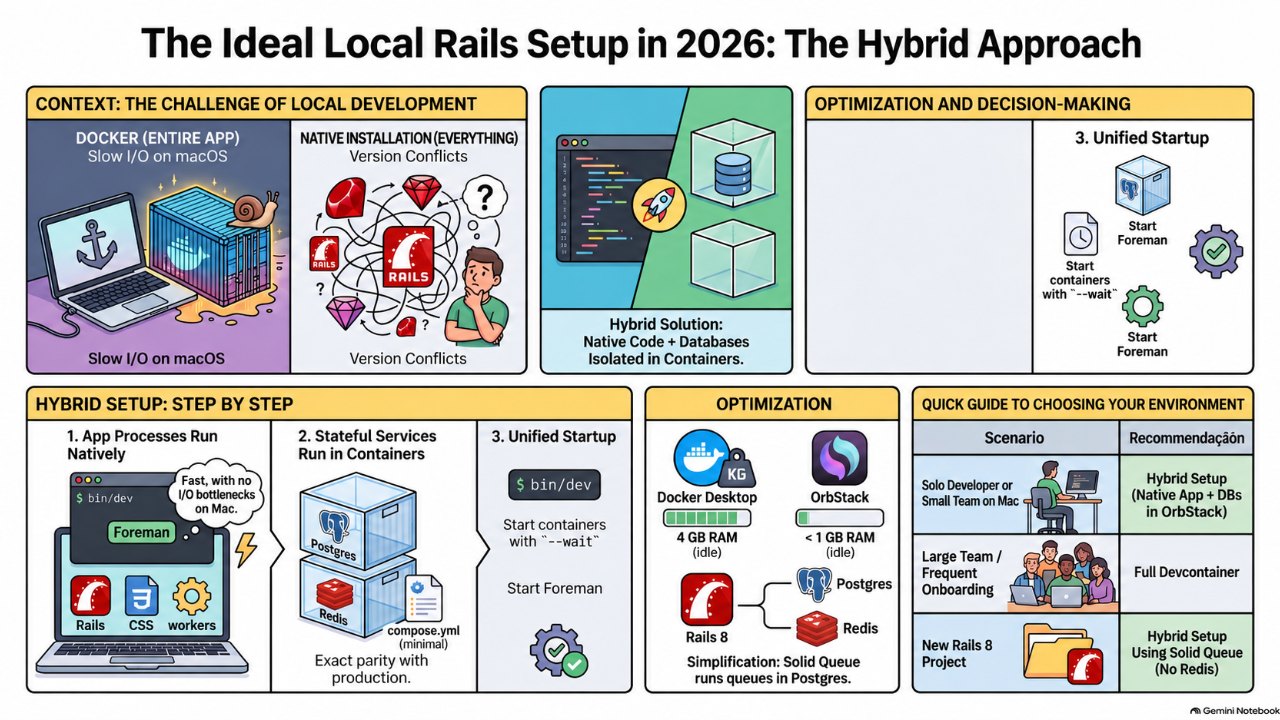
Run web, css, js and workers natively with bin/dev and Foreman. Put only Postgres and Redis in a minimal compose file, pinned to your production versions. On the Mac, swap Docker Desktop for OrbStack to cut RAM and disk usage. Save full compose or devcontainers for team onboarding and painful native dependencies.
Everything native with Procfile.dev, or everything in containers with docker-compose? The setup that works best day to day sits in between: native app processes, stateful services in containers, and a container runtime that does not eat your RAM.
Also available in Português (Brasil)
Every Rails project hits this fork in the road. On one side, a Procfile.dev with Foreman starting web, css, js and Sidekiq, with Postgres and Redis installed directly on the machine. On the other, a fully configured docker-compose.yml that behaves the same on every machine but turns your laptop into a space heater and eats gigabytes of disk.
After many years switching between the two, my recommendation is clear: neither extreme. Go hybrid.
The hybrid setup in one sentence
Application processes (Rails, CSS and JS watchers, workers) run natively through bin/dev. Stateful services (Postgres and Redis) run in containers, in a minimal compose file. On the Mac, the container runtime is OrbStack, not Docker Desktop.
Why not run Rails inside a container on the Mac
The biggest cost of Docker on macOS is not the container itself, it is the bind mount. Your code lives on the Mac filesystem while the container runs inside a Linux VM, so every file read crosses that boundary. In Rails, that shows up everywhere:
- app boot and Zeitwerk eager loading;
- per-request code reloading in development;
- Tailwind, esbuild or Vite watchers tracking thousands of files;
- the test suite reading fixtures and factories.
With native Ruby, that cost disappears. As a bonus, debug, binding.irb and editor integration just work, with no extra port or TTY wiring.
Why still containerize the services
Installing Postgres and Redis via Homebrew is the lightest path, but it has a classic problem: version drift. One project is on Postgres 16, another on 18, and production on RDS runs a third version. Containers give you:
- production parity: the image tag matches the major version of your managed database;
- per-project isolation: each app has its own volume, no fighting over ports or extensions;
- trivial resets:
docker compose down -vand you start clean.
And the cost is low. Idle Postgres and Redis use little memory. What made your old setup heavy was the rest of the stack running in containers and, above all, Docker Desktop itself.
The minimal compose file
# compose.yml
services:
  db:
    image: postgres:18
    environment:
      POSTGRES_PASSWORD: postgres
    ports: ["5432:5432"]
    volumes:
      - pgdata:/var/lib/postgresql
    healthcheck:
      test: ["CMD", "pg_isready", "-U", "postgres"]
      interval: 5s
      retries: 10

  redis:
    image: redis:8-alpine
    ports: ["6379:6379"]

volumes:
  pgdata:
Watch the volume path: starting with the official Postgres 18 image, the data directory lives in a per-version subdirectory. That is why the volume mounts at /var/lib/postgresql instead of /var/lib/postgresql/data as older examples show. It also makes future upgrades with pg_upgrade easier.
On Redis: Redis 8 brought back an open source license option (AGPL). If licensing is a concern at your company, Valkey is a compatible, BSD-licensed drop-in. Just swap the image.
The Procfile.dev
# Procfile.dev
web: bin/rails server -p 3000
css: bin/rails tailwindcss:watch
js: yarn build --watch
worker: bundle exec sidekiq
And environment variables pointing at the containers:
# .env
DATABASE_URL=postgres://postgres:postgres@localhost:5432
REDIS_URL=redis://localhost:6379/0
For a single command, have bin/dev start the services before Foreman:
#!/usr/bin/env sh
docker compose up -d --wait
exec foreman start -f Procfile.dev "$@"
--wait honors the healthcheck, so Rails only boots once Postgres is accepting connections.
Ruby and Node versions live in a .tool-versions file managed by mise and committed with the project. That keeps the "native" half reproducible too.
OrbStack: where the RAM savings come from
If your complaint is disk and memory, the likely culprit is Docker Desktop. It boots a Linux VM that reserves a large chunk of memory and does not always hand it back to macOS. OrbStack allocates memory on demand and releases it when containers go idle.
A benchmark published in 2026 on an M2 MacBook Pro with 16 GB measured Docker Desktop holding more than 4 GB with no containers running, against under 1 GB for OrbStack. System memory pressure sat in the red with Docker Desktop and in the green with OrbStack. Exact numbers vary by machine, but the order of magnitude matches what people report after switching.
Migration is simple: brew install orbstack, accept the import of your Docker Desktop data, and docker and docker compose keep working as before. One caveat: OrbStack is free for personal use, but commercial use requires the paid plan. Check before adopting it at work.
When full compose is worth it
The hybrid setup is not dogma. Containerizing everything makes sense when:
- the team is large or has turnover, and onboarding time matters more than individual performance;
- native dependencies are painful, such as specific libvips or ImageMagick versions, or proprietary database clients;
- the app depends on many neighboring services, like Elasticsearch, LocalStack or other microservices.
In those cases, prefer a devcontainer over a hand-rolled compose file. Rails generates the config with rails new --devcontainer, and editors like VS Code and RubyMine open the project straight inside the container. Running on OrbStack, the I/O penalty drops considerably compared to Docker Desktop.
Bonus: you may not need Redis at all
In Rails 8 apps, Solid Queue is configured by default and stores the queue in the database. In development you can run jobs inside Puma with SOLID_QUEUE_IN_PUMA=1, or as a separate process via bin/jobs in the Procfile. Result: one less container and one less process.
The tradeoff is real. Sidekiq still delivers higher throughput for heavy job workloads, and many apps already use Redis for caching or Action Cable. For a new or moderate-traffic project, though, starting with Postgres alone simplifies the environment a lot.
Decision summary
| Scenario | Recommendation |
|---|---|
| Solo dev or small team on Mac | Hybrid: native app, Postgres and Redis in compose, OrbStack |
| Single project, no version concerns | Postgres and Redis via Homebrew |
| Large team, frequent onboarding | Devcontainer |
| Complicated native dependencies | Devcontainer or full compose |
| New Rails 8 app | Hybrid with Solid Queue, no Redis |
The point of a local environment is to shorten the loop between saving a file and seeing the result. Running the app natively and containerizing only what holds state gets you there without giving up production parity.
Sources
- PostgreSQL FAQ: current version and release schedule www.postgresql.org
- PostgreSQL 19 Beta 4 Released www.postgresql.org
- OrbStack vs Docker Desktop (2026): Benchmarks, Pricing, and Who Should Switch thepromptshelf.dev
- Solid Queue (rails/solid_queue) github.com
- Alpine Linux redis package (AGPL-3.0 or SSPL-1.0 license) pkgs.alpinelinux.org
FAQ
Is running Rails inside Docker on the Mac slower?
Yes, mainly because of the bind mount between the macOS filesystem and the Linux VM. Boot, code reloading and asset watchers all feel it. Runtimes like OrbStack narrow the gap, but native Ruby is still faster.
Why not install Postgres directly with Homebrew?
It works and is the lightest option, but it makes it harder to match production versions and to isolate projects that need different versions. With containers, each project pins its own version.
Do I need Redis in a Rails 8 project?
Not necessarily. Solid Queue uses the database for the job queue and ships configured by default in Rails 8. Redis is still useful for Sidekiq under heavy load, caching and Action Cable.
Which Postgres version should the compose file use?
The same major version as your production database. As of October 2026, the latest stable release is PostgreSQL 18, with 19 still in beta.
Comments
Sign in with GitHub to comment.
No comments yet.