Standard Ruby on Apple Silicon and Docker: One Linter, Two Runners
TL;DR
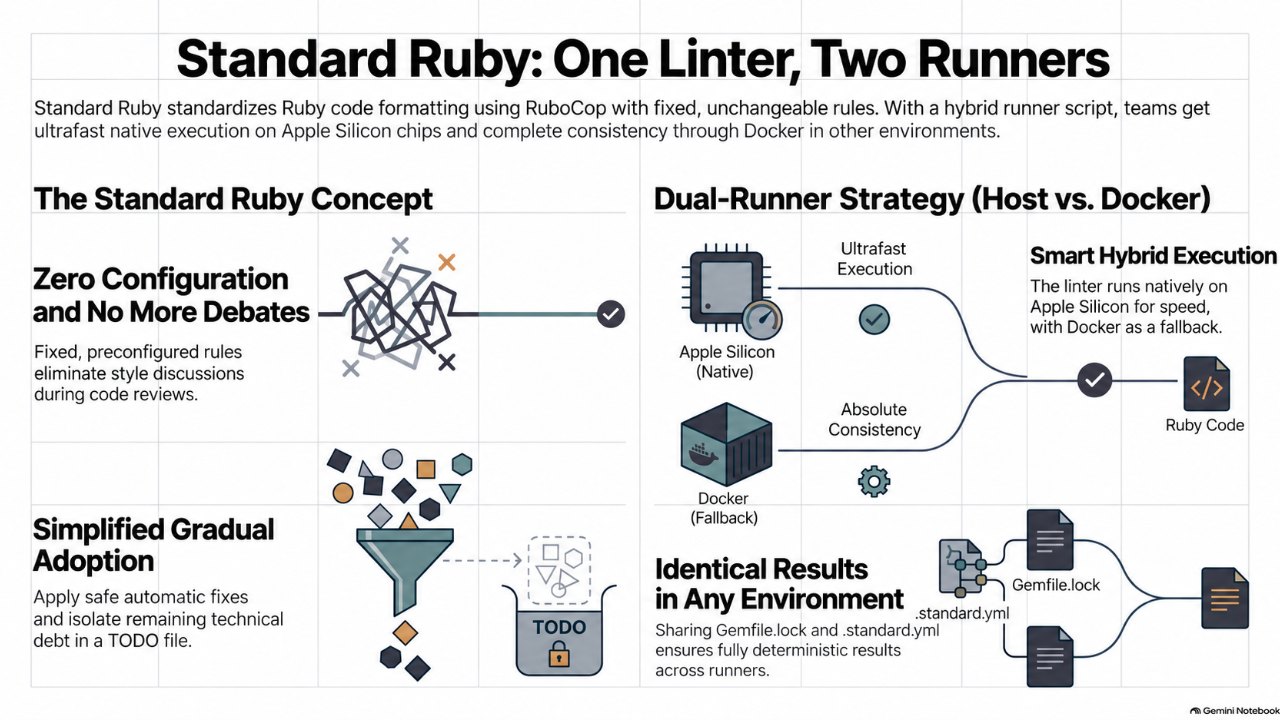
Standard is RuboCop with a fixed, community-debated ruleset, so teams stop arguing about style. Add it with standard-rails, pin ruby_version in .standard.yml, and adopt with --fix plus --generate-todo. A small bin/standardrb script runs it natively on Apple Silicon and in Docker elsewhere; with one lockfile, both runners return identical results.
Standard gives Ruby teams a linter and formatter with nothing to argue about. Here is what it does, how it sits on top of RuboCop, and a small script that runs it natively on Apple Silicon and in Docker everywhere else, with identical results.
Also available in Português (Brasil)
Every Ruby team has had the argument. Single or double quotes. Trailing commas. Hash alignment. Someone tunes .rubocop.yml to their taste, someone else flips a rule back in the next PR, and the linter becomes a source of churn instead of a safety net.
Standard ends that conversation by refusing to have it. This post covers what the gem gives you, how it works internally, and a practical setup for teams whose Rails app runs in Docker Compose: lint natively on Apple Silicon Macs, fall back to the container everywhere else, and get the same answer either way.
What Standard is
Standard (gem standard, executable standardrb) is a Ruby linter and formatter maintained by Test Double since 2018. It brings the StandardJS philosophy to Ruby: one ruleset, and you don't get to configure it.
Under the hood it is RuboCop plus rubocop-performance, with every cop's enabled state and settings decided for you. That ruleset is the product of years of community debate, and new releases land roughly monthly to keep pace with new RuboCop cops.
The argument for it is not that Standard's choices are the best possible ones. It is that the value of a linter comes from running one consistently, not from how it is tuned, and a fixed ruleset deletes a whole category of review comments and config churn.
Features worth knowing
- Lint and format in one tool.
standardrbreports offenses.standardrb --fixapplies autocorrections that are considered safe.standardrb --fix-unsafelyalso applies the ones that might change behavior, so run it on a clean working tree and let your tests judge. - Rake tasks. Add
require "standard/rake"to your Rakefile forrake standard,rake standard:fixandrake standard:fix_unsafely. CLI flags go through theSTANDARDOPTSenvironment variable. - Escape hatches without a config war. Disable a cop on one line or a block with
# standard:disable Cop/Name(and# standard:enable), ignore whole files or globs, or ignore specific cops for a glob in.standard.yml. - Incremental adoption.
standardrb --generate-todowrites a.standard_todo.ymllisting the existing offenses per file. New code is held to the full ruleset while you burn the backlog down. - Plugins.
standard-railsandstandard-sorbetadd framework-specific cops, and you can write your own with thelint_rollergem. Plugins add rules; they cannot loosen Standard's. extend_config. Point Standard at plain RuboCop YAML files to pull in extra cops (from a gem like betterlint, for example) without packaging a plugin.- Editor support through LSP. Standard ships a Ruby LSP add-on that loads automatically when the gem is in your Gemfile, with pull diagnostics, formatting and quick-fix code actions. For editors that don't use Ruby LSP,
standardrb --lspstarts a standalone language server. - Any RuboCop formatter.
--format progress,--format json, or--format githubfor inline annotations in GitHub Actions.
How it works
Standard does not fork RuboCop. Each run goes roughly like this:
- Read options. CLI flags plus
.standard.yml, which Standard finds by walking up from the current directory. - Build a RuboCop config in memory. Standard's base ruleset goes in first, then its default plugins (
standard-customandstandard-performance), then the plugins you list, then anyextend_configfiles. Configuration is first-in-wins: once a layer configures a cop, later layers cannot change it. That is how Standard stays "unconfigurable" while still being extensible. - Resolve the target Ruby.
ruby_versionbecomes RuboCop'sTargetRubyVersion. If you don't set it, it is inferred from files like.ruby-version,.tool-versions,Gemfile.lockor a gemspec. - Apply ignores. Default ignores, your
ignore:globs, and the todo file. - Hand off to RuboCop. Cops, autocorrect, the result cache and the formatters are all RuboCop's.
Three practical consequences follow:
- Upgrading Standard upgrades RuboCop and the ruleset together. Your
Gemfile.lockpins both, so you bump them on your schedule. - Given the same lockfile, the same
.standard.ymland the same target Ruby, results are deterministic no matter where Standard runs. That property is what makes the host/Docker split below safe. - Anything that understands RuboCop output already understands Standard.
Setting it up in a Rails app
# Gemfile
group :development, :test do
  gem "standard", require: false
  gem "standard-rails", require: false
end
# .standard.yml
ruby_version: 3.4        # match .ruby-version; pinning removes any host vs. container ambiguity
parallel: true
format: progress
plugins:
  - standard-rails       # Rails version is usually detected; pin with target_rails_version if needed
ignore:
  - "db/schema.rb"
  - "db/*_schema.rb"
  - "bin/**/*"
  - "vendor/**/*"
  - "node_modules/**/*"
  - "tmp/**/*"
# Rakefile
require "standard/rake"
If the app came from rails new on Rails 7.2 or later, it ships with rubocop-rails-omakase. To switch, remove that gem, .rubocop.yml and bin/rubocop, then update the lint step in CI. Adopt in two moves:
bundle exec standardrb --fix            # take every safe autocorrect
bundle exec standardrb --generate-todo  # park whatever is left
Commit those separately from feature work so the diff stays reviewable.
Native on Apple Silicon, Docker everywhere else
Here is the situation this section solves. The app runs in Docker Compose, and linting through docker compose run works on every machine. But every invocation boots a container and reads the project through Docker Desktop's file sharing. That is fine in CI and tolerable now and then, but it is slow in a pre-commit hook.
On Apple Silicon Macs, a native Ruby is quick to install with mise, rbenv or asdf. Common native gems like pg publish precompiled arm64-darwin builds. Running Standard on the host there is fast and cheap to maintain.
On Intel Macs, Linux workstations, or any machine without a matching host Ruby, the container stays the dependable path.
Because both paths read the same Gemfile.lock and .standard.yml, they produce the same results. The only decision is which runner to use, and a script can make that decision.
Preparing the host
# Install the Ruby the image uses
mise install ruby@"$(cat .ruby-version)"   # or rbenv/asdf

# Make sure container-oriented Bundler settings are not leaking onto the host
env | grep BUNDLE_               # unset BUNDLE_PATH, BUNDLE_APP_CONFIG, BUNDLE_DEPLOYMENT, BUNDLE_WITHOUT
cat .bundle/config 2>/dev/null   # remove container paths such as /usr/local/bundle

bundle install
bundle exec standardrb
Four gotchas show up when the lockfile has only ever been resolved inside Linux:
- Lockfile platforms. The first host install adds
arm64-darwintoGemfile.lock, and frozen or deployment mode will refuse to do it. Add the platform once and commit it:bundle lock --add-platform arm64-darwin. - Shared
vendor/bundle. If the container installs gems intovendor/bundleinside the bind mount, don't install into the same path on the host. Linux and Darwin native extensions will overwrite each other. Let the host use your version manager's default gem home. - Native gems. Since 1.6,
pgships precompiled platform gems with libpq built in, so the host usually needs no Homebrew PostgreSQL. Gems without binary builds, such asmysql2, still need their client libraries installed locally, even though linting never loads them. - Rosetta terminals. If your terminal app has "Open using Rosetta" enabled,
uname -mreportsx86_64on an Apple Silicon Mac. The script below accounts for that, but a native terminal is still the better default.
The runner script
Save this as bin/standardrb and chmod +x it. (If you ever run bundle binstubs standard, don't let it overwrite this file.)
#!/bin/sh
# Run Standard natively on Apple Silicon, in Docker everywhere else.
# Override with STANDARDRB_RUNNER=local|docker.
set -eu

ROOT="$(cd "$(dirname "$0")/.." && pwd)"
cd "$ROOT"

is_apple_silicon() {
  [ "$(uname -s)" = "Darwin" ] || return 1
  # Native arm64 shell
  [ "$(uname -m)" = "arm64" ] && return 0
  # x86_64 shell translated by Rosetta, which only exists on Apple Silicon
  [ "$(sysctl -n sysctl.proc_translated 2>/dev/null || echo 0)" = "1" ] && return 0
  # Hardware flag as a last check
  [ "$(sysctl -n hw.optional.arm64 2>/dev/null || echo 0)" = "1" ]
}

local_ready() {
  command -v bundle >/dev/null 2>&1 && bundle check >/dev/null 2>&1
}

run_local() {
  exec bundle exec standardrb "$@"
}

run_docker() {
  exec docker compose run --rm -T app bundle exec standardrb "$@"
}

case "${STANDARDRB_RUNNER:-auto}" in
  local)  run_local "$@" ;;
  docker) run_docker "$@" ;;
  auto)   ;;
  *)      echo "STANDARDRB_RUNNER must be auto, local or docker" >&2; exit 64 ;;
esac

if is_apple_silicon; then
  if local_ready; then
    run_local "$@"
  fi
  echo "standardrb: host bundle not ready (run bundle install); using Docker" >&2
fi

run_docker "$@"
Usage:
bin/standardrb                            # lint
bin/standardrb --fix                      # autocorrect
bin/standardrb app/models/user.rb         # specific files
STANDARDRB_RUNNER=docker bin/standardrb   # force the container, e.g. to compare runners
How it decides:
- Apple Silicon detection. It checks three things in order: a native
arm64shell, a Rosetta-translated shell (sysctl.proc_translatedis1), and finally thehw.optional.arm64hardware flag. Checking onlyuname -mgets Rosetta terminals wrong, and the hardware flag alone may not be visible from a translated process. - Fallback when the host isn't ready.
bundle checkconfirms that every gem in the lockfile is installed before the script commits to the host. If it fails, the script prints a one-line hint and uses Docker instead of erroring. - Exit codes pass through.
execreplaces the shell, so hooks and CI fail on offenses with either runner. - Container TTY.
-Tdisables TTY allocation so the container path works inside hooks and other non-interactive shells. (--no-TTYis the same flag; you only need one.)
Two caveats:
PATHin hooks and GUI clients. Git hooks and GUI Git clients often run without your version manager's shims onPATH. The script then falls back to Docker. If you want the native path there too, addeval "$(mise activate sh)"(or the rbenv equivalent) near the top.- File ownership on Linux. On a Linux host,
--fixthrough Docker writes files as the container user, often root. Add--user "$(id -u):$(id -g)"to thedocker compose runline if the image's gem path is readable by that user.
Wiring it into your workflow
Editor. Use Ruby LSP with Standard's add-on. The language server is long-running and talks to the host bundle directly; the script isn't involved.
// .vscode/settings.json
{
  "rubyLsp.rubyVersionManager": { "identifier": "mise" },
  "rubyLsp.formatter": "standard",
  "rubyLsp.linters": ["standard"],
  "[ruby]": {
    "editor.defaultFormatter": "Shopify.ruby-lsp",
    "editor.formatOnSave": true
  }
}
Disable any separate Standard or RuboCop extension to avoid duplicate diagnostics. On machines without a host Ruby, open the project in a Dev Container so Ruby LSP runs inside it.
Pre-commit. Route the hook through the script so every machine picks the right runner:
# lefthook.yml
pre-commit:
  commands:
    standard:
      glob: "*.{rb,rake}"
      run: bin/standardrb --fix --force-exclusion {staged_files}
      stage_fixed: true
--force-exclusion matters here. When files are passed explicitly, RuboCop lints them even if they match an ignore: glob, so without the flag a staged db/schema.rb gets linted, and possibly rewritten, after every migration.
CI. Skip detection. Call Standard directly in whatever environment CI already uses, whether that is the app image or ruby/setup-ruby, and use the GitHub formatter for inline annotations:
bundle exec standardrb --format github
Wrapping up
Standard removes the style debate by design, and because it is RuboCop underneath, it fits into every tool that already speaks RuboCop. Pin the target Ruby in .standard.yml, keep a single lockfile, and the question of where it runs becomes a performance detail rather than a correctness one: native on Apple Silicon for speed, Docker everywhere else for consistency, and the same verdict from both.
Sources
- Standard Ruby (README) github.com
- Standard Ruby wiki: VS Code with Ruby LSP github.com
- standard-rails plugin github.com
- RuboCop configuration: setting the target Ruby version docs.rubocop.org
- Ruby LSP github.com
- pg gem on RubyGems.org rubygems.org
- docker compose run reference docs.docker.com
- Lefthook github.com
FAQ
Can I change Standard's rules?
No. You can disable a cop on a line or block with `# standard:disable`, ignore files or specific cops per glob in `.standard.yml`, and add rules through plugins or `extend_config`. What you cannot do is reconfigure a cop Standard already configures, because its configuration is first-in-wins.
How is Standard different from rubocop-rails-omakase?
Both are RuboCop configurations. Omakase is the default in new Rails apps since 7.2 and lives in an editable `.rubocop.yml`. Standard keeps its ruleset fixed and adds its own CLI, Rake tasks, todo file and Ruby LSP add-on. Pick one: their layout rules disagree, so running both produces conflicting autocorrects.
Will the host run and the Docker run really give the same results?
Yes, as long as both read the same `Gemfile.lock` (same Standard and RuboCop versions), the same `.standard.yml` and the same target Ruby. Pinning `ruby_version` in `.standard.yml` removes the last variable between the two runners.
Do I need PostgreSQL installed on the Mac to lint on the host?
Usually not. Since 1.6, `pg` ships precompiled `arm64-darwin` gems with libpq included. Gems without binary builds, such as `mysql2`, still need their client libraries to install, even though Standard never loads them.
How do I adopt Standard in a large existing codebase?
Run `standardrb --fix` to take every safe autocorrect, then `standardrb --generate-todo` to record the remaining offenses in `.standard_todo.yml`. New code meets the full ruleset from day one, and you delete todo entries as you fix them. Commit both steps separately from feature work.
Why does the script fall back to Docker on my Apple Silicon Mac?
Either `bundle` is not on `PATH` or `bundle check` failed. Git hooks and GUI clients often skip your version manager's shims, so activate mise or rbenv at the top of the script, run `bundle install` on the host, or force the native path with `STANDARDRB_RUNNER=local`.
Comments
Sign in with GitHub to comment.
No comments yet.